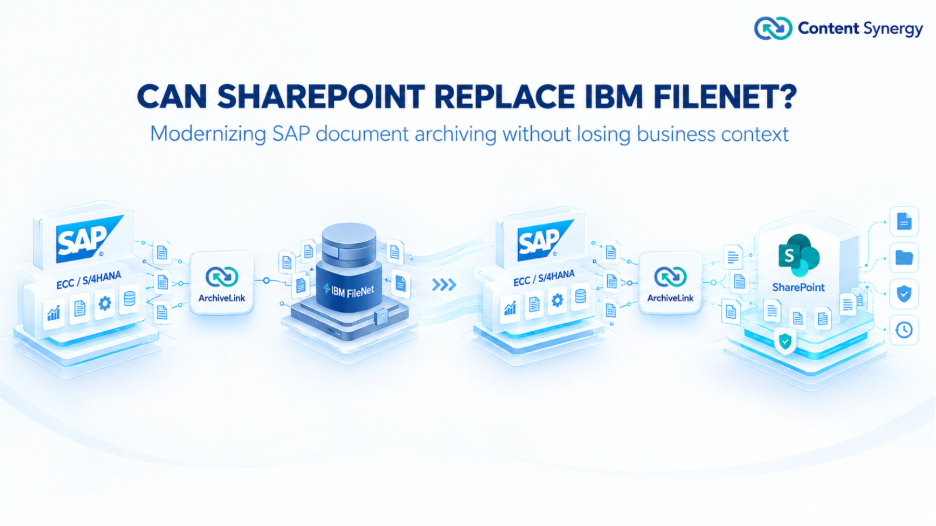

SAP Documents. Securely Archived. Seamlessly Accessible.
SAP archived documents do not stop being business-critical when a transaction is complete. SAP document archiving is therefore not simply a storage decision. It is an architectural decision involving accessibility, governance, integration, recovery, and long-term maintainability.
For organizations modernizing legacy repositories, Microsoft SharePoint can be evaluated as a destination for SAP archived content when it is connected through an appropriate SAP ArchiveLink integration layer. SAP continues to manage business transactions and their relationships to archived documents, while the external repository provides the content-storage layer.
This matters for enterprises considering repository migration, IBM FileNet replacement, or Microsoft 365.
An SAP ArchiveLink content repository is an external storage destination used with SAP ArchiveLink to store and retrieve documents associated with SAP business objects. SAP describes ArchiveLink as a service for linking archived documents with application documents in SAP. The stored document is identified through the content repository and document ID, while the SAP business object provides the business context for the link.
The relationship can be summarized as:
SAP business transaction → ArchiveLink → Content Repository → Document Storage
ArchiveLink does not mean SAP becomes the physical document repository. SAP maintains the business relationship and document link, while the configured content repository stores the document. SAP’s content repository configuration defines the repository and storage system, while ArchiveLink customizing associates document types and business object relationships with the repository.
This separation allows repository modernization to be considered independently from changes to the SAP application landscape.
A repository can be operational today and still create a long-term architecture problem.
Enterprise archives accumulate invoices, purchase orders, correspondence, reports, scanned documents, engineering records, and other business content over many years. Their access frequency may be low, but the business impact of losing access can be high.
A resilient SAP archive should therefore answer more than “Where are the files stored?”
It should answer:
These questions move the discussion from document storage to clean SAP architecture.
Legacy repositories such as IBM FileNet, OpenText, or SAP Content Server may continue to support business requirements. The issue is not that an older repository is automatically unsuitable. The relevant question is whether its architecture remains aligned with current and future requirements.
Potential dependencies can include dedicated infrastructure, platform-specific administration, specialized skills, separate storage management, and integration components that no longer fit the organization’s strategic direction.
Growing archive volumes add another consideration. An SAP document repository needs a storage strategy that accounts for future content growth. SharePoint Online has documented tenant, site, library, and storage limits that should be evaluated during architecture planning rather than assumed away.
The same principle applies to operations. If knowledge of the current repository is concentrated in a small group, the organization should consider administration, support, incident response, upgrades, and knowledge transfer over the platform’s lifecycle.

For enterprises already using Microsoft 365, SharePoint can be considered as part of a broader content-repository strategy. SharePoint provides document storage and management capabilities, while Microsoft 365 services can support information governance and retention scenarios.
Microsoft documents that SharePoint content can be subject to retention policies and retention labels through Microsoft Purview. The controls available depend on the organization’s Microsoft 365 configuration, licensing, and governance design.
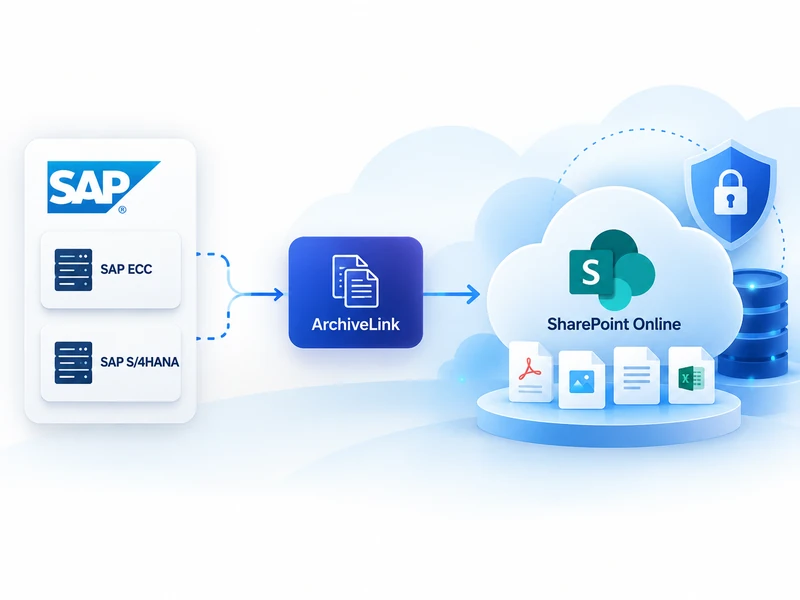
The architectural point is important: SharePoint does not become an SAP ArchiveLink repository simply because an organization uses Microsoft 365. An integration layer is required to connect SAP ArchiveLink with the selected repository and support the required storage and retrieval behavior.
The relationship can be represented as:
SAP ECC / SAP S/4HANA → ArchiveLink integration → SharePoint Online → Document Storage
This separation allows enterprises to modernize the repository without turning SharePoint into a replacement for SAP’s business application layer.
Repository and capacity Start with document types, business objects, volumes, retention requirements, access patterns, existing repository configuration, and future growth. SharePoint capacity should be planned using current Microsoft service limits; Microsoft currently documents up to 25 TB per site and up to 30 million files and folders in a library, subject to applicable limits and configuration considerations.
ArchiveLink integration ArchiveLink establishes relationships between SAP object types, document types, content repositories, and stored documents. During modernization, validate repository IDs, document types, object relationships, retrieval behavior, and integration configuration before changing the destination.
Governance and recovery Archived content can include financial, employee, customer, legal, and operational information. Consider access control, retention, lifecycle, audit requirements, recovery, and administrative ownership. SharePoint and Microsoft Purview support retention scenarios, but requirements should be mapped to the controls actually licensed and configured.
Historical content A new repository solves only part of the problem if years of SAP documents remain on the old platform. For IBM FileNet environments, assess content, metadata, SAP relationships, permissions, retention requirements, and validation before migration. Treat the move as an information-management exercise, not simply a file-copy operation.
SAP ECC and SAP S/4HANA can both participate in ArchiveLink-based document archiving. SAP documentation for ERP and S/4HANA describes ArchiveLink content repositories and relationships between SAP application objects and stored documents.
The modernization context can differ.
In an SAP ECC environment, the review may focus on replacing or stabilizing an existing repository while maintaining established business processes.
In an SAP S/4HANA program, the archive should be assessed early because historical documents and repository dependencies can remain relevant during application modernization. SAP’s current S/4HANA documentation continues to describe ArchiveLink connections and content repositories.
The practical lesson is simple: do not wait until an SAP transformation is underway to discover how historical documents are stored and retrieved.
A repository migration should begin with discovery rather than immediately moving files.
Area | Questions to Answer |
SAP landscape | Which ECC or S/4HANA systems and clients use the repository? |
ArchiveLink | Which repository IDs, document types, object types, and links are configured? |
Content | What document classes, volumes, and historical periods exist? |
Metadata | Which attributes are required for retrieval, governance, and validation? |
Dependencies | Which applications, interfaces, workflows, and users depend on the archive? |
Governance | What retention, access, and lifecycle requirements apply? |
Migration | How will content and relationships be transferred and validated? |
Operations | Who owns administration, monitoring, recovery, and support afterward? |
This assessment helps distinguish repository replacement from a broader ECM transformation. Not every SAP archive needs to become a general-purpose collaboration environment.

It can be evaluated as a replacement when IBM FileNet is being used as an SAP ArchiveLink repository, but the answer depends on the actual architecture.
The evaluation should consider the existing FileNet repository structure, SAP ArchiveLink configuration, content volumes, metadata, document relationships, security model, retention requirements, migration approach, and target SharePoint architecture.
A replacement is not simply a file copy. The enterprise needs to preserve the context that allows SAP users and applications to locate and retrieve the correct documents.
That is the core of clean SAP architecture: the repository can change while the SAP business process remains centered on SAP.
Content Synergy is an enterprise content archiving solution built around SAP ArchiveLink. It connects SAP environments with modern content repositories including Microsoft SharePoint Online, Azure Blob Storage, and Amazon S3.
For an organization evaluating SAP archive repository migration, the question is not simply whether a new repository is available. It is whether the target architecture provides a practical connection between SAP, ArchiveLink, and the chosen content destination.
Content Synergy can be considered for SAP ECC or SAP S/4HANA document archiving, SharePoint-based repository modernization, and evaluation of legacy repository replacement. The appropriate architecture depends on the organization’s SAP landscape, repository requirements, governance model, and migration scope.
A review is worth considering when the current repository depends on aging infrastructure, specialized legacy skills, fragmented governance, increasing archive volumes, or technology that no longer aligns with strategic direction.
It is also relevant when an enterprise is expanding its Microsoft 365 investment, preparing for SAP S/4HANA modernization, or evaluating whether IBM FileNet remains appropriate for SAP document archiving.
These signals indicate that the current repository architecture should be assessed.
Resilience is broader than storage. Teams should avoid treating ArchiveLink as an implementation detail, moving only new documents while leaving historical content behind, assuming cloud automatically creates resilience, or waiting until an S/4HANA program is advanced before reviewing archive dependencies.
An external storage destination connected to SAP through ArchiveLink for storing and retrieving documents associated with SAP business objects.
Yes. SharePoint can be evaluated as a repository destination when an appropriate ArchiveLink integration connects SAP with SharePoint.
Yes. SAP ECC environments can use ArchiveLink with external content repositories, subject to the specific SAP release, configuration, and target architecture.
Assess ArchiveLink configuration, repository structure, historical content, metadata, document relationships, access controls, retention, migration, validation, and long-term operations.
Yes. SAP S/4HANA environments can use ArchiveLink-based content repositories, with the design assessed for the relevant release and modernization requirements.

Blog post excerpt [1-2 lines]. This text is automatically pulled from your existing blog post.
Blog post excerpt [1-2 lines]. This text is automatically pulled from your existing blog post.